Features
First-class life tools,
and an AI that knows you.
Without AI, Xico AI is still a great set of life tools. With AI, every module gets smarter. Here's everything Xico AI does.
Today
Today, at a glance
Your first screen answers three questions in three seconds: what matters most today, how am I doing, and what comes next?

-
Xico AI briefings
Priorities and schedule in the morning; a review and one reflective question at night. Every part cites its sources.
-
Timeline
Today's events and time blocks, with the next one highlighted and one-tap join.
-
My Day
Planned, due and overdue tasks you can check off right there — with a small celebration when you finish.
-
Habits and mood
Check in by time of day; record a mood with one tap.
-
Spending today
What you spent today, what’s left this month, and a quick way to log more.
-
Countdowns and focus
Pinned countdowns, this week's top three and goal progress.
-
Ordered by time
Briefing first in the morning, review first at night — or arrange the cards yourself.
-
Ambient light
The top of the page shifts gently with the time of day.
-
Health and On This Day Coming later
Steps, sleep and workouts, plus journal entries and photos from past years.
Capture
Two-second capture
One input, two intentions: write something down, or ask Xico AI a question.
-
Eight kinds
Tasks, events, expenses, income, journal, notes, moods and countdowns — detected from one sentence.
-
On-device parsing
Dates, amounts, lists, tags, priority and people are parsed instantly, even offline.
-
Many things at once
"Buy milk tomorrow, report due Friday, lunch 12" becomes three items, each confirmed.
-
Recognition chips
Every detected field is a chip — date, list, amount, category — that you can tap to change.
-
Voice Coming later
Hold to speak, transcribed on device, saved after you confirm.
-
Everywhere
An always-there bar and widgets on iPhone, a global shortcut on Mac, Q or ⌘K on the web.
-
Receipts and screenshots Coming later
Turn a photo into an expense in one step.
Xico AI
Xico AI, your AI companion
A warm, honest companion who knows your life: capture assistant, life secretary, analyst and growth coach.
-
Grounded answers
Streaming replies that know which page you are on, with clickable sources whenever your data is involved.
-
Computed numbers
Amounts, durations and projections come from deterministic tools; Xico AI explains them.
-
Plan My Day
Time blocks proposed around your meetings, task estimates and energy — accept them one by one.
-
Memory
Everything Xico AI remembers shows its source and can be edited or deleted. Sensitive details are never memorized automatically.
-
Restrained nudges
At most two a day (adjustable), never during quiet hours, and always with “why am I seeing this?”.
-
Xico AI proposes, you decide
Batch changes, anything that affects others, and anything irreversible always ask first.
-
Three personalities
Warm friend, rational mentor or strict coach — plus your own notes to Xico AI.
-
Transparent models and tokens
Auto or a model of your choice, with usage shown on every answer.
Tasks
Tasks, clear and satisfying
Inbox, lists and projects, and a My Day you choose fresh every morning — every task can link to the life goal it serves.
-
Smart lists
Inbox, My Day, Planned, Important, All, Completed and tag views.
-
Lists and projects
Folders; projects with due dates, linked life goals and a progress ring.
-
Complete task details
Subtasks, separate due and do dates, multiple reminders, full repeat rules, priority, estimates.
-
Natural language
"Fri 3pm weekly report #work !high" — highlighted into chips as you type.
-
Satisfying completion
A signature animation and haptics, with four seconds to undo.
-
Keyboard first
A full set of shortcuts on Mac and the web.
-
Microsoft To Do sync
Lists, tasks, steps, due dates and completion, both ways.
-
Board, matrix and focus timer Coming later
More views, and a Pomodoro timer that can count toward habits.
-
Import from other apps Coming later
Bring in exports from popular task apps.
Calendar
Calendar, together with tasks
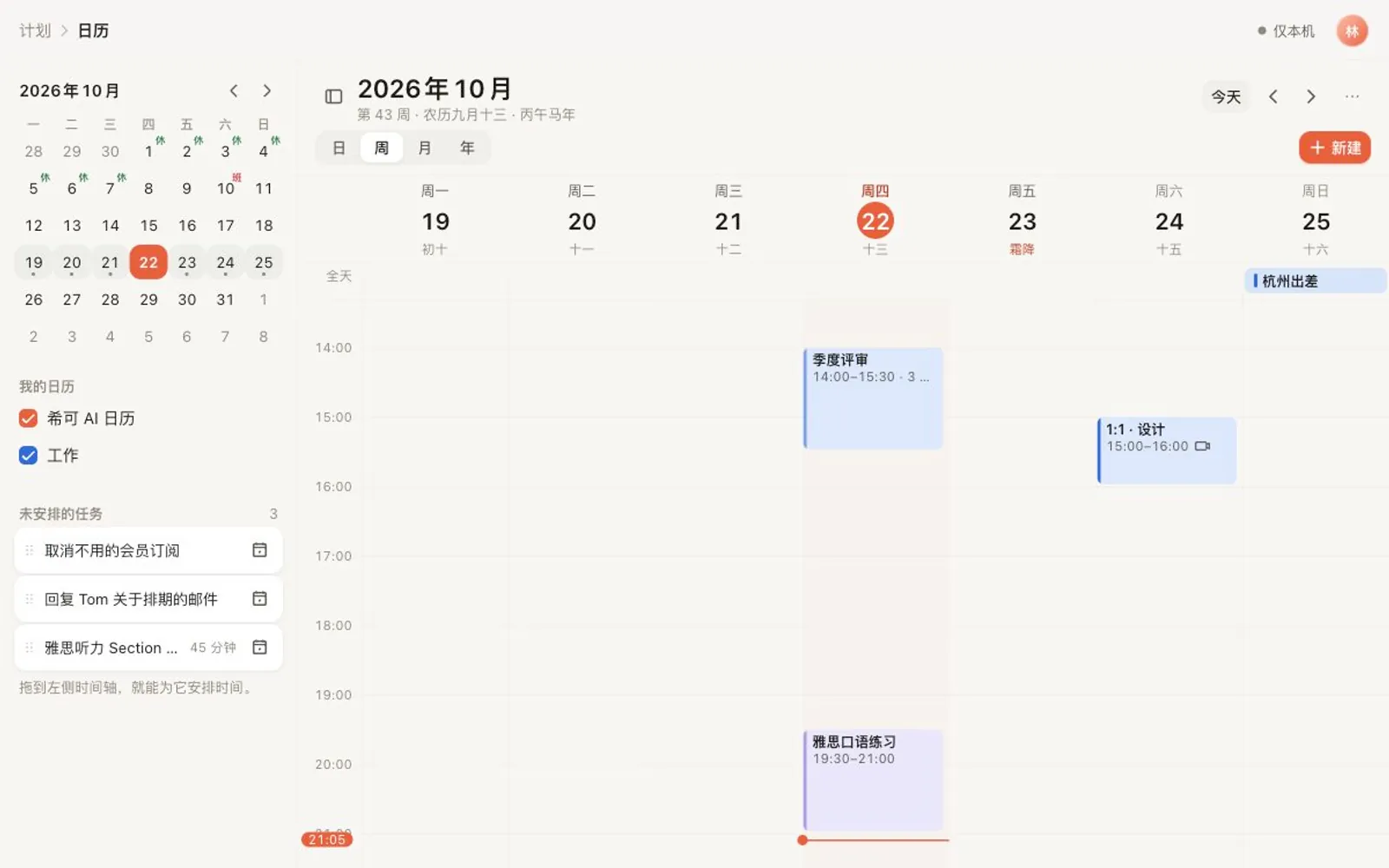
Connect Apple, Google and Microsoft calendars. Drag a task onto the timeline and it becomes a time block.
-
Two-way sync
Apple iCloud (on device), Google and Microsoft — multiple accounts.
-
Day, multi-day, week, month, agenda
Pinch to zoom the timeline; a year view is coming later.
-
Unscheduled tray
Today's unscheduled tasks sit beside the timeline — drag one in to block time, check it off in place.
-
Holidays and lunar dates
Lunar dates and solar terms, plus official holidays and make-up workdays.
-
One-tap join
Recognizes Zoom, Google Meet, Teams, Webex, Tencent Meeting, Feishu and DingTalk links.
-
Multiple time zones
Up to four time-zone columns side by side.
-
⌘K and shortcuts
T for today, D / W / M to switch views, C to create.
-
Xico AI scheduling
Finds time for tasks between meetings, following your preferences — you confirm.
-
Share availability and booking links Coming later
Select free slots to share, or create a booking page.
Journal
Journal, warm and private
Write quietly in a serif, record moods on a spectrum, and let Xico AI ask one deeper question when you want it.

-
An editor made for writing
Reading-size type, serif titles, a comfortable measure and a focus mode.
-
Mood spectrum
Five anchors and a continuous slider, plus emotion tags — never color alone.
-
Multiple journals
Personal, gratitude, travel, dreams… each with its own icon, cover and lock.
-
Photos and places
Add photos, and type or locate where you are; location data inside photo files is removed before they’re stored.
-
Voice entries Coming later
Speech tidied into readable text, with the original audio and transcript kept.
-
Suggestions and Today’s Moments
Apple's Journaling Suggestions on iPhone, and Xico AI's own moments on Mac and the web too.
-
Quick thoughts
One line, a mood and a photo — like a post only you can see.
-
Templates
Morning pages, evening review, three good things, five-minute journal and more.
-
One deeper question
After you write, Xico AI can ask one follow-up — only one at a time.
Docs
Docs, your second brain
Study notes, yearly plans, trips and meeting notes in one graceful block editor.
-
Page tree
Nest pages endlessly; a home with recents, favorites and templates.
-
Rich blocks
Headings, lists, to-dos, quotes, toggles, callouts, code, images, galleries and link cards.
-
Slash menu and Markdown
Type / to insert any block; the Markdown shortcuts you know all work.
-
Reference your life
Embed tasks, events, transactions and goals with live status you can check off.
-
To-dos become tasks
Turn a to-do into a real task with one click, synced both ways.
-
Inline AI
Write, continue, summarize, translate, change tone, or pull out tasks.
-
Export
Markdown, PDF and HTML.
-
Backlinks, tables and import Coming later
[[ links, simple tables, and import from Notion and Markdown.
Money
Money, three seconds per entry
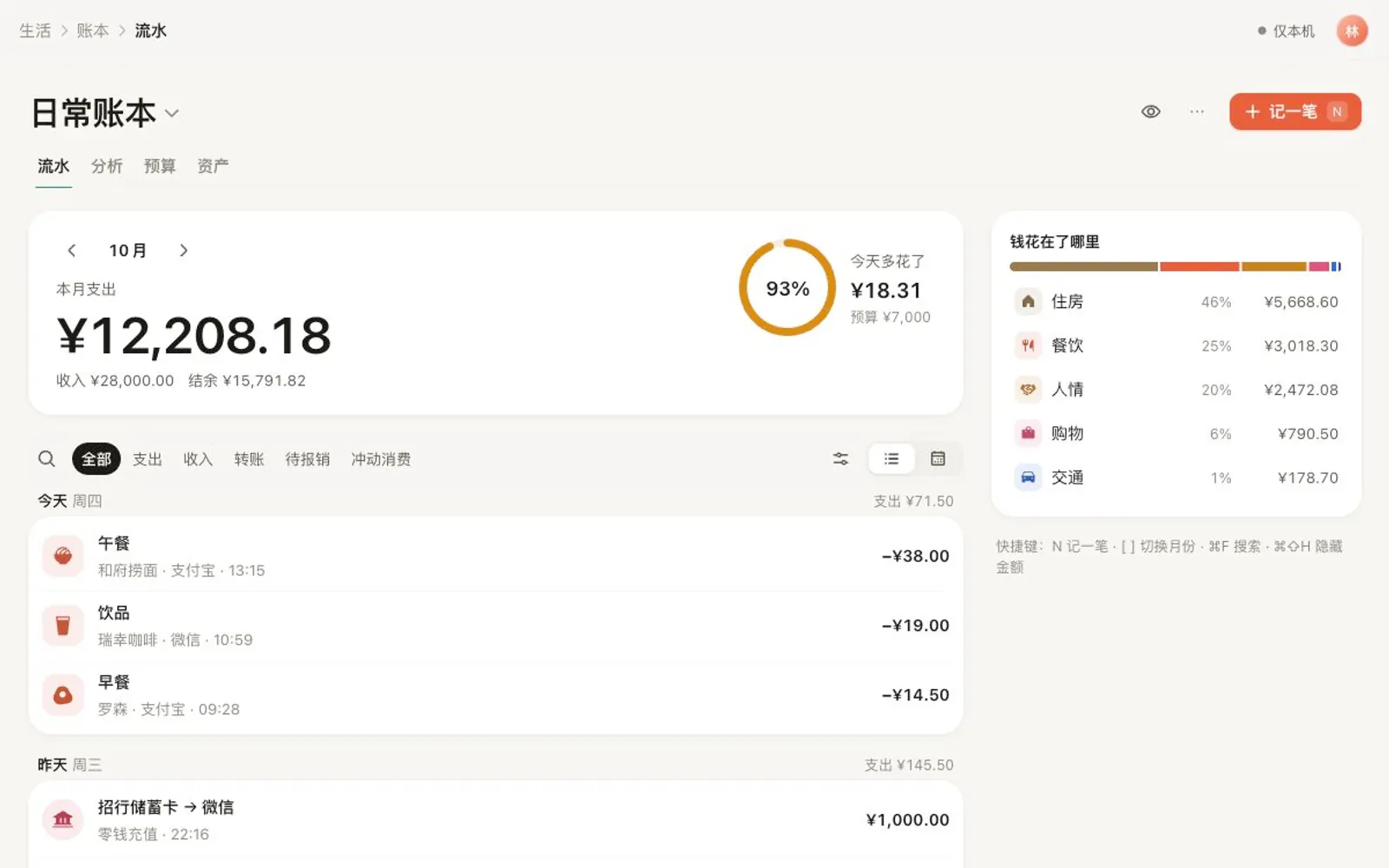
Pick a category, type the amount, done. Budgets, accounts, bills and subscriptions live here — with no ads, ever.
-
Calculator keypad
Plus and minus math, “log another”, and categories suggested by time of day.
-
One-sentence logging
"Lunch 12 Apple Pay, taxi 23 card" becomes two entries to confirm.
-
Two-level categories
120 crafted category icons, with custom colors and tags.
-
Accounts and net worth
Credit-card statement and due dates, balance adjustments and a net-worth trend.
-
Budgets and “left today”
Monthly and category budgets, with one reminder at 80% and one at 100%.
-
Bills and subscriptions
Rent, salary and subscriptions in one place, with a heads-up before renewals.
-
Ledgers and currencies
Separate household, travel and business books; travel ledgers convert automatically.
-
Import
Alipay, WeChat Pay and CSV: de-duplicated, auto-categorized, and undoable as a batch.
-
Reports
Category share, trends, a spending calendar and rankings for any period.
-
Savings plans and impulse buys
Link savings to a life goal; tag impulse buys and review them monthly.
-
Privacy mode
Hide every amount as •••• in one tap.
-
Screenshot logging and wishlist Coming later
Read payment screenshots and receipts; a wishlist with a 7-day cool-off.
Habits
Habits, day after day
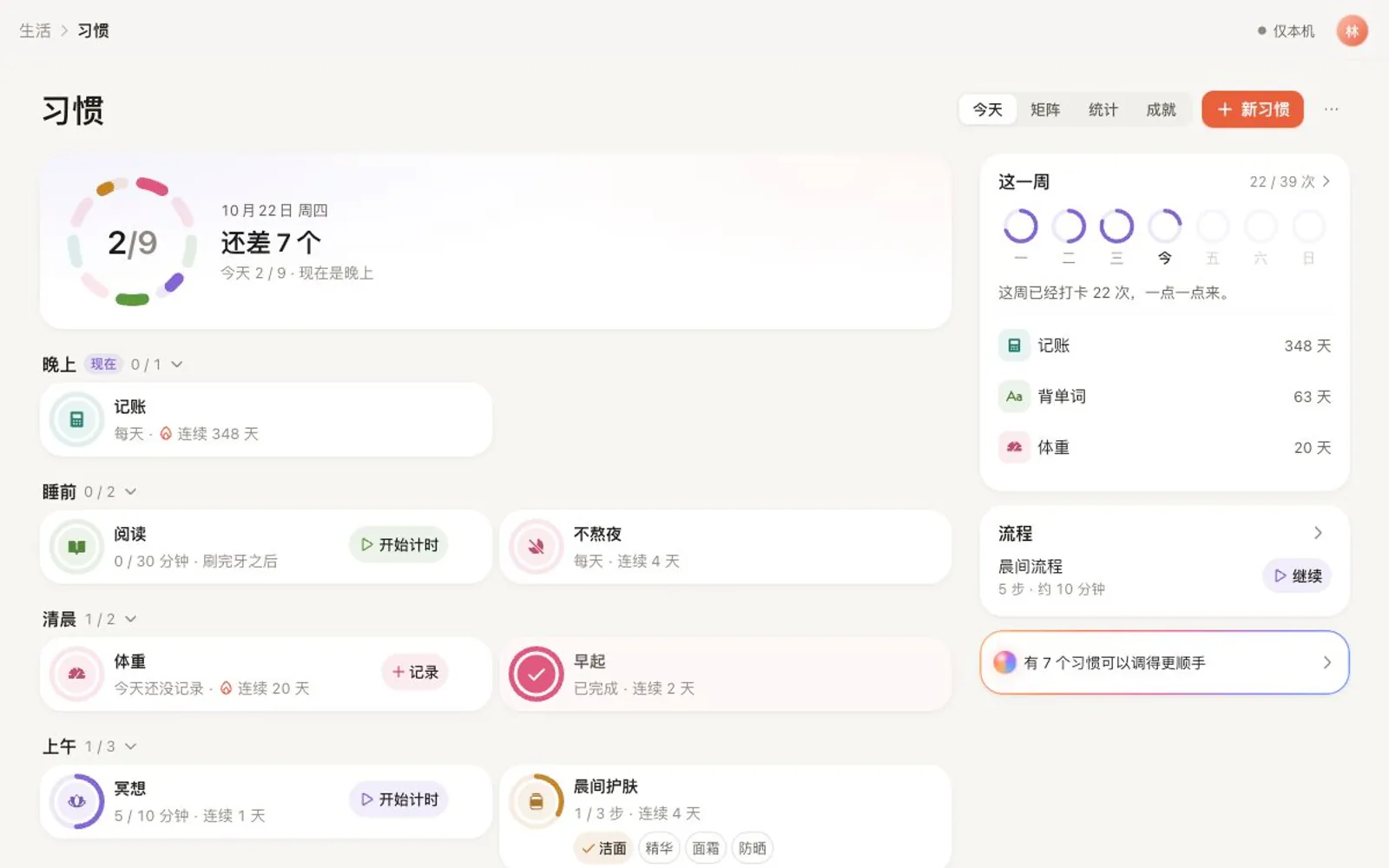
A positive, anxiety-free habit system that celebrates effort, allows rest, and ties every check-in to who you want to become.
-
Four kinds
Check-in, count (8 glasses), timed (read 30 minutes) and quit (no bubble tea).
-
Flexible schedules
Daily, certain weekdays, N times a week, every N days, or several times a day.
-
Your day, your start
A check-in at 1 AM can still count as “today”.
-
Two ways to check in
Flip a card or fill a ring — both with haptics.
-
Milestones
Days 7, 21, 30, 66, 100 and 365 each get a celebration and a card to share.
-
Freeze cards and rest days
Miss a day now and then without breaking the streak.
-
Identity votes
“You’ve cast 128 votes for someone who moves every day.”
-
Health auto check-in
Steps, workouts, sleep and mindfulness from Apple Health complete habits for you.
-
Monthly light jar Coming later
Each check-in drops a bead of light; by month’s end the jar is full.
Life
Life, from today to a lifetime
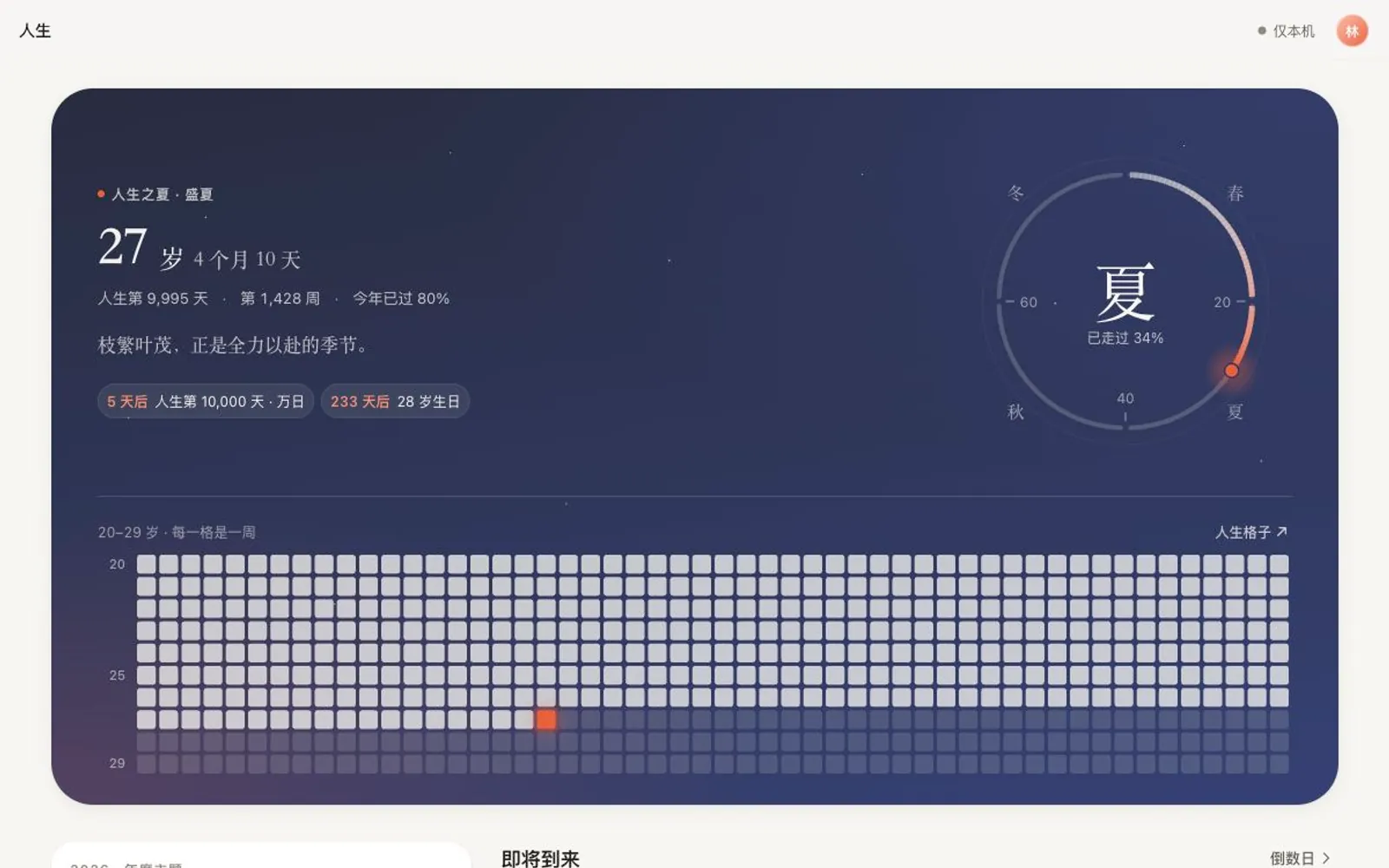
Connect small daily actions with who you want to become and the life you want to live.
-
Life grid
Your life in weeks, months or years; gentle mode shows only what you have lived and now.
-
Life blueprint
Vision, core values, who you want to become, and a wheel-of-life check-in.
-
Goals by age
A timeline from now to 25, 30, 35, 40 and a lifetime.
-
Goal breakdown
Life goal → year → quarter → month → week → today, with a draft from Xico AI if you like.
-
Automatic progress
Savings, distance run and study hours come straight from Money, Health, Habits and Focus.
-
Yearly plan
One theme word, three to five goals, quarterly check-ins.
-
Countdowns and anniversaries
Count down or up, birthdays and anniversaries — lunar dates included.
-
Life list and milestones
Things to do in a lifetime and moments that mattered, shown on your life grid.
-
Time capsule Coming later
Letters to your future self, sealed until the day you choose.
Your life in weeks
Your whole life,
at a glance.
Eighty years is about 4,160 weeks. Each square is one week: the ones you have lived in ink, this week in morning light.
Xiao has lived 1,436 weeks. Every week ahead deserves to be lived well.
Example: Xiao, age 27
Growth plans
Growth plans, built on your real data
Career moves, study, studying abroad, money and big decisions. Xico AI already knows your savings, time and consistency, and only asks for what is missing.
-
Career
Skill gaps, market information, financial runway, timing and a stay-or-go matrix.
-
Study and skills
Available time estimated from your calendar and focus history, with stages and mock-test milestones.
-
Studying abroad
A timeline worked back from deadlines, and how much to save each month.
-
Money goals
Cash-flow analysis and scenarios — never specific investment products.
-
Life decisions
Values alignment, pros and cons, three scenarios and low-cost experiments.
-
A real plan
Feasibility score with reasons, path comparison, risks and the next three things.
-
Put it in motion
Milestones, tasks, habits, countdowns and calendar blocks — choose, then create.
-
Keeps up with you
Every two weeks by default, Xico AI compares plan and reality and suggests adjustments.
-
Health plans Coming later
Training and sleep plans with progress from Apple Health; not medical advice.
Reviews
Reviews that show your patterns
At the end of each week, Xico AI helps you see what you did, how you felt and how close you are to your goals.
-
Weekly review
Every Sunday evening: tasks, habits, focus, journal, mood, money and exercise, summarized.
-
Three insights
With the data behind them and sample sizes — correlation, clearly not causation.
-
Reflection and next week
Three questions, and next week’s top three as tasks in one tap.
-
Share cards
Hide amounts, weight and other sensitive numbers.
-
Monthly, quarterly and yearly reviews Coming later
A story-like year in review, and a birthday look-back.
Sync
Sync you never think about
Our server is the single source of truth, so iPhone, iPad, Mac and the web always agree.
-
1–3 seconds
for changes to appear on your other devices — nothing to tap.
-
Offline
Keep capturing and editing offline; it syncs when you reconnect.
-
Field-level merge
Edit different fields of the same item on two devices without overwriting.
-
Fast new devices
Today and the last 30 days first, the rest in the background.
-
Recently Deleted
Restore anything within 30 days.
-
Export any time
JSON, Markdown and CSV — free plan included.
Xico AI is being built in the open: the web app is in early access and features arrive release by release. Items marked "Coming later" land after 1.0. Every update goes into the changelog.
Start today.
Make every week count.
Xico AI for the web is open in early access. The iPhone and iPad apps are being polished and are coming soon to the App Store.